Managed Firewall and Threat Prevention for Northern Ireland Businesses
Full onsite deployment of firewall hardware, DNS filtering, and endpoint hardening. Ongoing monitoring and maintenance included.
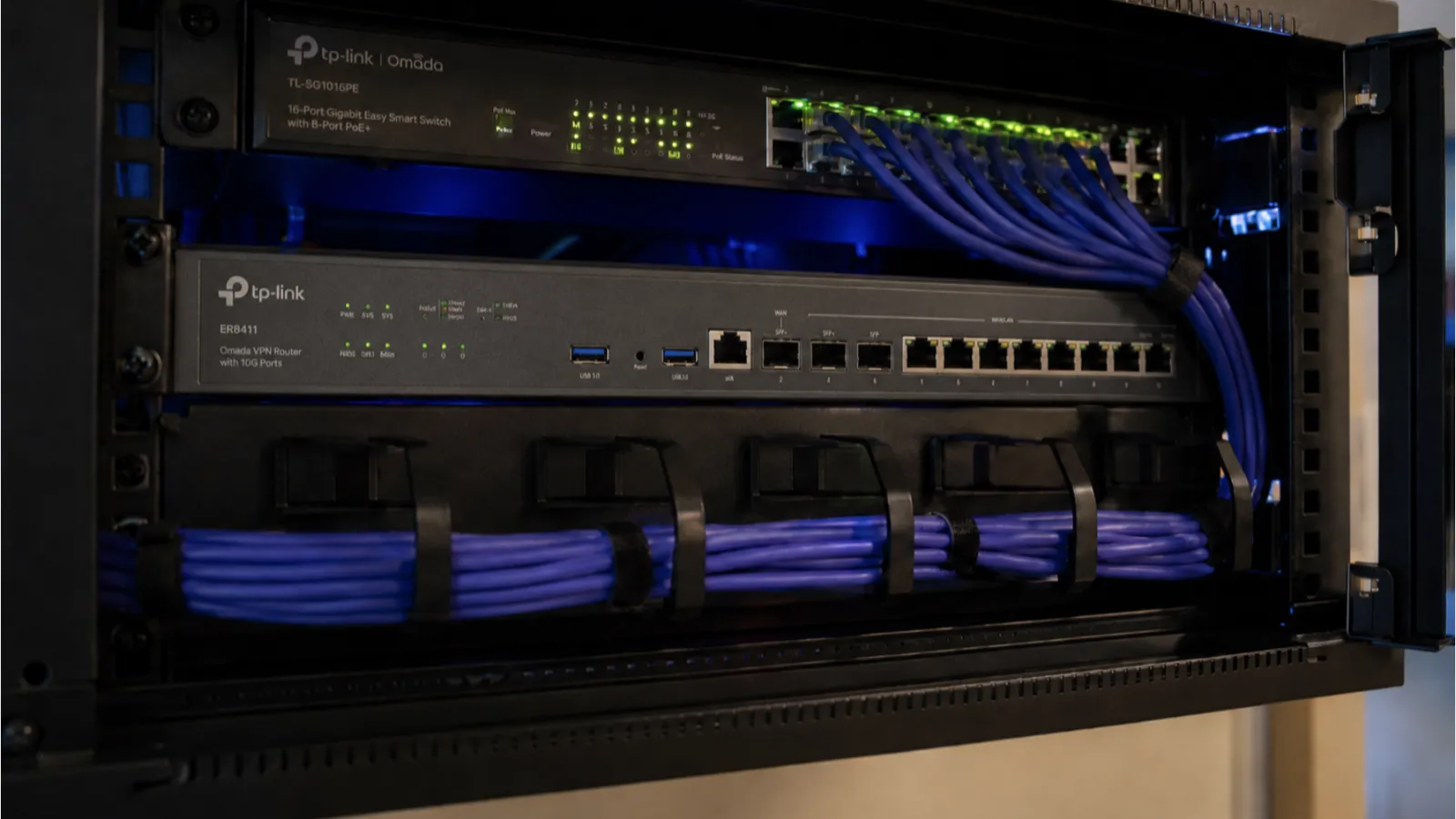
In Northern Ireland, we deploy the full security stack onsite. That means a physical firewall with IDS/IPS enabled, a dedicated DNS filtering server using maintained threat blocklists, VLAN segmentation isolating different device types, and endpoint hardening on every workstation. Then we monitor and maintain it remotely as part of an ongoing support arrangement.
This is not antivirus software. It is layered network security deployed as infrastructure, managed and maintained by the same person who installed it.
For the design of separate networks for guests, cameras, phones and production devices, see network segmentation and VLAN isolation.
What Gets Deployed
- Business-grade firewall with IDS/IPS enabled, DoS protection, application control, and deep packet inspection. Not a consumer router with a strong password.
- DNS threat filtering server blocking malware, phishing, ransomware distribution, command and control domains, cryptojacking, and advertising/tracking networks. Blocklists are aggregated from multiple third-party maintained sources.
- VLAN network segmentation isolating staff, guests, IoT, VoIP, CCTV, and printers on separate network segments with firewall rules between them.
- Endpoint hardening on every Windows device: BitLocker encryption, Controlled Folder Access (ransomware protection), Secure Boot, MFA enforced, SMBv1 disabled, browser hardening.
- Email security: SPF, DKIM and DMARC moved to a reject policy. This stops most direct spoofing of your own domain where receiving servers honour it; look-alike domains and display-name tricks still need filtering and staff awareness.
- Secure remote access via encrypted mesh VPN. Zero open ports on your router. No attack surface for scanners to find.
Traffic checked before it reaches the business network
What Gets Monitored Ongoing
- DNS query logs reviewed for suspicious patterns
- Firewall IDS/IPS alerts reviewed
- Endpoint health checked (Defender active, encryption on, patches current)
- Failed login attempts and brute-force activity tracked
- File integrity monitoring on critical system files
- Monthly summary: what was blocked, what was flagged, any recommendations
Why This Matters for Small NI Businesses
Small businesses in Northern Ireland face the same phishing emails, ransomware campaigns, and credential theft attempts as large enterprises. The difference is that large companies have dedicated security teams. Small businesses typically have nothing beyond the default settings on a consumer router and whatever Windows Defender does by default.
A managed firewall and threat prevention setup closes that gap. It does not make you invulnerable, but it blocks the vast majority of common attacks before they reach your staff, and it gives you visibility into what is happening on your network that you currently do not have.
Difference from Antivirus
Antivirus runs on one device and catches threats that have already reached it. Managed firewall and DNS filtering block threats at the network boundary before any device is exposed. They work at different layers:
- Network boundary (firewall + IDS/IPS) - blocks known attack patterns in network traffic
- DNS layer (threat filtering) - blocks connections to malicious domains before anything loads
- Endpoint (Defender + hardening) - catches anything that gets past the first two layers
All three layers run simultaneously. If one misses something, the next catches it.
Coverage
Full onsite deployment (hardware installation, server setup, VLAN configuration, endpoint hardening): all of Northern Ireland.
Ongoing monitoring and management: remote, included in the support arrangement.
For businesses outside Northern Ireland who want remote monitoring and DNS filtering without onsite hardware deployment, get in touch and we will confirm what we can deliver remotely.
Get a Security Review
Tell me what you have. I will check your current router, DNS setup, and endpoints, and tell you what is exposed. Onsite across Northern Ireland.
Related
- Managed IT and telecoms support contracts
- Managed IT and cyber security - the full technical stack
- Business firewalls and routers Northern Ireland - hardware supply and configuration
- Cybersecurity essentials for small business
Engineer's Notes: Detection Only Helps When Someone Responds
IDS, IPS and deep packet inspection can identify suspicious traffic, known exploit patterns and unusual application behaviour. The value comes from sensible policy, useful logging and a response process, not from enabling every signature and creating thousands of alerts.
We separate systems where practical, monitor important traffic between subnets and tune controls around the applications the business actually uses. High-confidence events may support automatic actions such as blocking an IP address, isolating a device or raising an urgent incident. Lower-confidence events normally need investigation to avoid disrupting legitimate work.
Firewall data becomes more useful when correlated with endpoint, identity, DNS and Microsoft 365 events in a SIEM or monitoring platform. A single failed login may mean little. Repeated failures, an unusual location, a privilege change and unexpected outbound traffic together may indicate a developing incident.
Technical review: Prepared and reviewed by Kieran Bourquin, Drakos Systems. Last reviewed .
Frequently Asked Questions
What does a managed firewall actually do?
A managed firewall sits between your internet connection and your internal network. It blocks unauthorised access attempts, filters DNS requests to prevent staff reaching known malicious websites, monitors all network traffic for suspicious patterns, and logs everything for review. Unlike a consumer router, it actively inspects traffic rather than simply forwarding it.
How much does a managed firewall cost?
Managed firewall and DNS filtering can be part of a support contract or a standalone service. The price depends on site size, the number of devices and whether onsite hardware is needed, and we confirm it at quote after a short site review.
Do I still need a firewall if I already have antivirus?
Yes. Antivirus and firewalls protect at different layers. Antivirus scans files on a single device after they arrive. A firewall blocks threats at the network boundary before they reach any device. DNS filtering stops your machines connecting to dangerous websites in the first place. Think of it as locking the front door (firewall) versus having a guard inside each room (antivirus). You need both.
What is DNS filtering and how does it protect my business?
DNS filtering checks every website request against a list of known dangerous domains before the page loads. If someone clicks a phishing link or visits a compromised website, the connection is blocked before any content reaches their device. It protects every device on your network automatically, including phones, printers, and IoT devices that cannot run antivirus software.
How do you monitor for threats on an ongoing basis?
We use automated alerting that flags suspicious activity in real time: unusual DNS queries, repeated failed login attempts, and traffic to known bad destinations. Our DNS filtering uses regularly updated, third-party maintained threat blocklists. Firewall firmware is kept current, and monthly reports are available showing what was blocked and any recommendations for your network.